Baby Language Development Apps: Early Support for Communication Skills
Mother & baby
|
March 13, 2026
It is easy to worry when another baby at playgroup is babbling nonstop while yours mostly smiles, points, or makes the same two sounds all day. Baby language development apps can give parents structure, but they work best when they guide adult interaction rather than turning the phone into a babysitter.
The most useful tools help you notice patterns, build small daily routines, and prepare better questions for your pediatrician. They cannot diagnose speech delays in toddlers, and they should never replace face-to-face talking, singing, reading, and play.
What Language Apps Can Actually Do For A Baby
A baby does not learn to talk by watching an app. Early communication grows through eye contact, turn-taking, facial expression, touch, repetition, and everyday response. When your baby kicks during a diaper change and you say, “You are kicking your feet,” then pause and wait for a sound, you are doing more for language than a bright video ever could.
Good baby language development apps are mainly for parents. They remind you what to watch for, suggest short activities, and help you track speech milestones for infants without relying on memory alone.
Best Apps For Baby Speech Milestones
Not every app labeled “educational” is useful for early communication. Some are built around cartoons, tapping games, and passive videos. For infants and young toddlers, parent-coaching apps are usually more helpful because they keep the adult involved.
| App |
Best For |
When to Use |
Link |
| CDC Milestone Tracker |
Free milestone tracking |
Birth through preschool |
|
| Kinedu |
Daily developmental activities |
When you want guided play ideas |
|
| BabySparks |
Short parent-led activities |
Busy days and quick routines |
|
| Pathways.org Baby Milestones |
Motor and communication guidance |
Parents wanting free expert-backed videos |
|
| Speech Blubs |
Toddler speech imitation |
Older toddlers with parent supervision |
|
| Lingokids |
Early language play |
Preschoolers, not young babies |
The CDC Milestone Tracker is the safest starting point because it is free and not trying to sell premium play plans. It helps parents record communication markers like responding to sounds, using gestures, babbling, and saying early words.

Kinedu and BabySparks are better for parents who want daily prompts. They are useful when you know you should talk and play more intentionally but your tired brain cannot come up with ideas at 7 a.m.
Speech Blubs can help some toddlers imitate sounds, but it works best when a parent sits beside the child and turns the app into a shared activity. Lingokids is better suited for older toddlers and preschoolers. It is not the right tool for a baby who needs real-world back-and-forth interaction.
Matching Apps To Your Child’s Age
A newborn does not need a language lesson. A newborn needs your voice, feeding cues, soft repetition, and calm responses. By six months, babies usually enjoy sound play, songs, and exaggerated facial expressions. By twelve months, gestures become a big part of communication.
| Age |
What to Watch For |
Best App Use |
| 0 to 3 months |
Startles to sound, calms to voice, watches faces |
Use apps only to track milestones |
| 4 to 6 months |
Cooing, laughing, turning toward sound |
Try parent-led play prompts |
| 7 to 9 months |
Babbling, copying sounds, responding to name |
Track sound patterns and gestures |
| 10 to 12 months |
Pointing, waving, “mama” or “dada” sounds |
Log communication attempts |
| 12 to 18 months |
First meaningful words, following simple directions |
Use activity ideas, not passive videos |
| 18 to 24 months |
Word growth, simple phrases |
Consider speech-focused tools if concerned |
The goal is not to make your child perform every milestone on the app’s schedule. Babies often focus on one area at a time. A baby learning to crawl may talk less for a few weeks. A toddler recovering from illness may stop using a few words temporarily, then regain them.
Tracking helps when it shows a pattern over time. It becomes stressful when it turns every day into a test.
Better Ways To Use Language Apps During Normal Routines
The most helpful app activity is the one you can fit into something you already do. Parents do not need another complicated task added to feeding, laundry, work, and bedtime.
Use app prompts during:
- Diaper changes
- Bath time
- Feeding
- Stroller walks
- Getting dressed
- Floor play
- Bedtime books
During a diaper change, name body parts and pause. During meals, repeat simple words like “more,” “milk,” “all done,” and “spoon.” During stroller walks, label real things your baby can see: dog, car, tree, bus, light.
This is where apps such as BabySparks and Kinedu can be helpful. They remind you to slow down and create a small language moment without needing special toys.
Screen Time Versus Real Interaction
The biggest mistake with baby language apps is handing the phone to the baby and hoping speech will improve. For infants, screen time is not the same as interaction. A video can make sounds, but it cannot read your baby’s face, wait for a response, or change tone based on your child’s reaction.
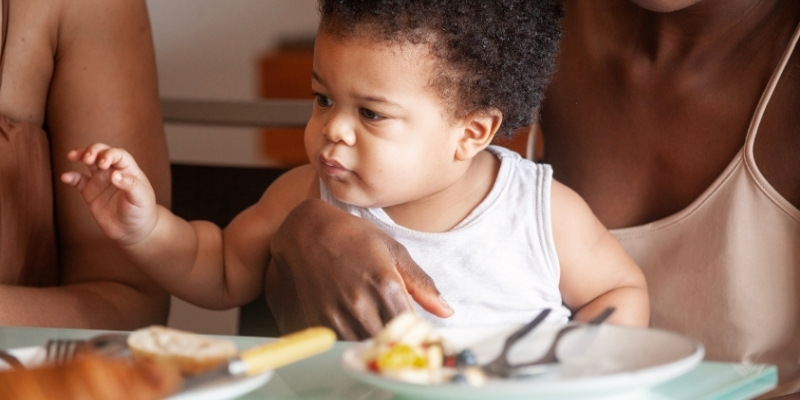
The AAP family media guidance is useful here. For babies and young toddlers, live interaction is far more valuable than passive viewing.
A practical rule is simple: the app is for the adult, not the baby. Use it to choose an activity, then put the phone down.
Privacy And Paid Subscriptions
Many baby milestone tracking apps ask for your child’s name, birth date, photos, videos, or audio recordings. Some families are comfortable with that. Others are not. Before uploading clips of your baby babbling, check whether the app stores audio in the cloud, shares data with partners, or uses recordings to improve its tools.
Free public health tools usually collect less commercial data. Premium apps may offer richer activity libraries, but the monthly cost can add up quickly.
| App Type |
Cost |
Privacy Concern |
Best Use |
| Public milestone tracker |
Free |
Usually lower |
Basic tracking |
| Parent coaching app |
Often paid |
Medium |
Daily routines |
| Speech imitation app |
Often paid |
Medium to high |
Supervised toddler practice |
| Audio analysis app |
Usually premium |
Higher |
Use carefully and read privacy terms |
If your budget is tight, you can use ASHA charts, the CDC tracker, and your phone’s notes app. Write down new sounds, gestures, and words by date. That simple record can be very helpful at pediatric visits.
When Apps Are Not Enough
Apps can reassure you when development is on track, but they can also delay action if parents keep hoping one more activity will fix a real issue. Trust your observations.
Speak with your pediatrician if your baby does not respond to sound, does not make eye contact, does not smile socially by around six months, does not babble by around nine months, or does not use gestures like pointing or waving by around twelve months.
For toddlers, ask for help if there are very few meaningful words by eighteen months, no two-word phrases by around two years, or any loss of words or social skills at any age. A hearing check is often one of the first steps because fluid, ear infections, or hearing loss can affect speech development.
The ASHA ProFind directory can help families locate certified speech-language pathologists in the United States. Early intervention programs may also offer evaluations through local health services, sometimes at low or no cost.
A Simple Parent-Led Language Routine
You do not need a perfect speech plan. A steady rhythm works better than an intense burst of activities for three days.
Try this routine for one week:
| Time of Day |
Language Habit |
Example |
| Morning change |
Name actions |
“Socks on. Shirt on. Zip up.” |
| Breakfast |
Offer choices |
“Banana or toast?” |
| Playtime |
Copy baby sounds |
Baby says “ba,” parent says “ba-ba.” |
| Walk |
Label what you see |
“Big truck. Loud truck.” |
| Bath |
Repeat simple words |
“Splash. Wash. More water.” |
| Bedtime |
Read the same short book |
Pause for familiar words |
Repetition is not boring for babies. It is how they learn. A word heard once may disappear. A word heard every day during the same routine starts to stick.
Choosing The Right App Without Overthinking It
Pick one app for tracking and one source for activity ideas. More than that usually creates clutter. If you like clean, official guidance, start with the CDC Milestone Tracker and ASHA milestone pages. If you want daily prompts, try Kinedu or BabySparks for a month and see whether you actually use them.
Avoid apps that promise fast speech results, rely heavily on cartoons, or push constant screen engagement for infants. The best baby language development apps make you feel more confident during real-life interaction, not more dependent on your phone.
Your child does not need a perfect language program. They need responsive adults who talk, pause, listen, repeat, read, sing, and notice when something feels off. Use apps as a support tool, keep most language practice inside ordinary routines, and bring concerns to a pediatrician early rather than waiting for an app to confirm what you already suspect.
Just For You

How Much Does a One-Week Trip to Japan Cost Complete Budget Breakdown
May 9, 2026

Traveling Alone These Are the Best Places to Travel Solo in 2026
April 19, 2026

Top Highlighting and Contouring Tips for Every Face Shape
March 26, 2026

Flavorful Tea Cocktail Ideas With Simple And Easy Instructions
March 21, 2026

Detailed Look At HVAC Training Programs For Aspiring Technicians
March 19, 2026

How to Become a Digital Nomad from Scratch (Even With a Regular Job)
March 15, 2026
Recommended For You
Why Feather Soft Breathable Diapers Are the Best for Summer

Can a Perfume Really Support Your Mood? Here’s What to Know

How To Perfectly Pair Tea With Food: Expert Tips And Tricks

Herbal Mushroom Teas You Can Drink Daily for Health and Focus

Alcoholic Tea Trends: Creative Flavor Innovation And Market Growth